// TOM'S HARDWARE US — HARDWARE & GADGET
Gigabyte X870 Aorus Infinity Motherboard Review: limited-edition, designed for extreme overclocking, but pricey for X870
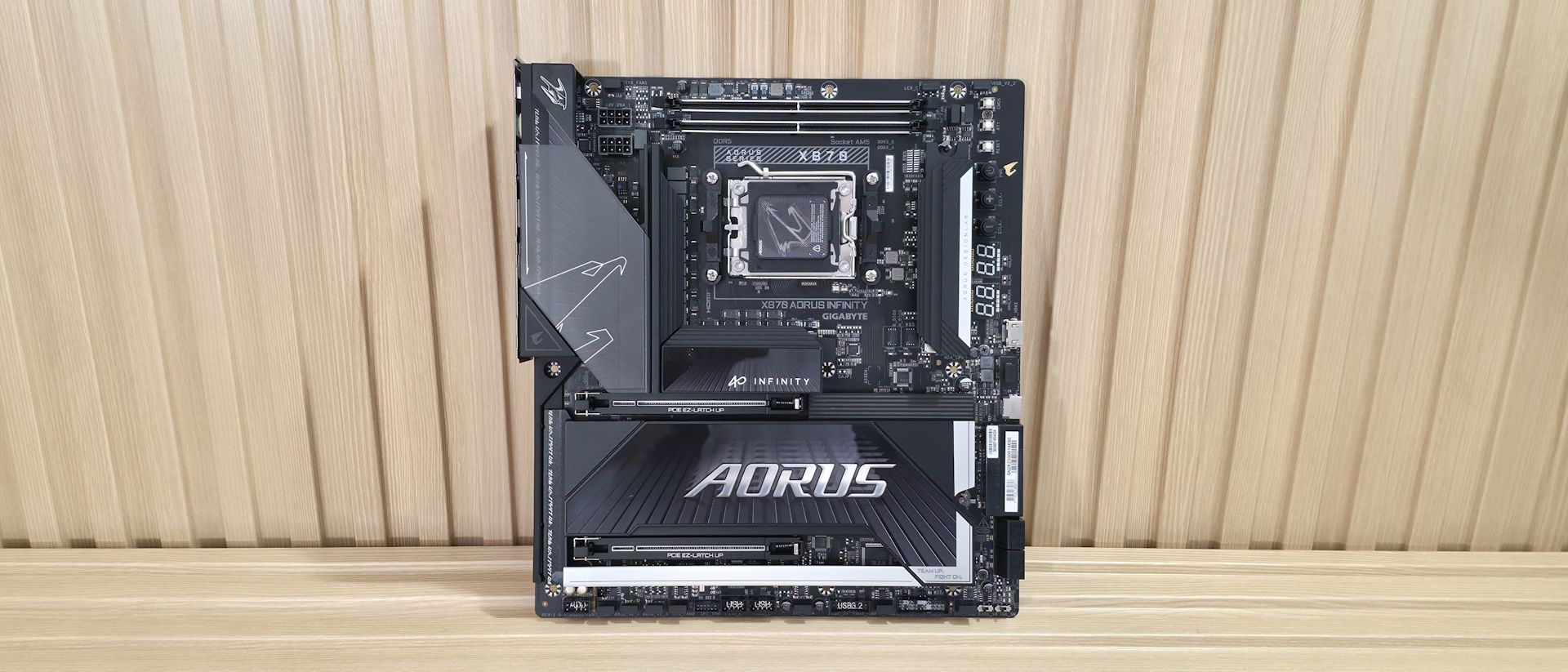
Gigabyte’s X870 Aorus Infinity blends extreme overclocking ability and tools with good all-around features and aesthetics. But you’ll have to pay up for this limited-edition board’s flexibility.
Why you can trust Tom's Hardware
Our expert reviewers spend hours testing and comparing products and services so you can choose the best for you. Find out more about how we test.
At Computex 2026, we saw Gigabyte’s concept X870E Aorus Infinity Next motherboard using that incredible-looking space-age material for VRM cooling, along with something more practical: the X870 Aorus Infinity, a production board, not a concept. The Infinity is made for overclockers. Just look at the right edge: All those buttons and voltage read points make pushing the limits even easier. It sports a two-DIMM design, with the DRAM slots above the socket, prioritizing speed over capacity. Priced at an eye-opening $799.99, it's far from cheap (it is a 40th-anniversary limited-edition board), even for the enthusiast X870E platform, but it offers a wide range of features that work for nearly everyone.As far as specifications go, the Aorus Infinity is well-equipped for an X870 board. You get eight total USB ports on the rear IO (one USB4), three M.2 sockets (one PCIe 5.0), and four SATA ports for storage, fast networking with 5 GbE and Wi-Fi 7 (320 MHz), and a quality last-gen flagship-class audio codec. And of course, there are all of the features designed for overclocking, including robust power delivery and the Overclocking kit, with several buttons and voltage read points, to take some of the complications of extreme overclocking down a notch. Gigabyte also lists support for a staggering DDR5-11400(OC), but it needs manual tweaking, specialized BIOS fine-tuning, and the right hardware (likely an APU with an excellent IMC).
On the performance front, the X870 Aorus Infinity delivered average-to-above-average results across most tests, using our primary Kingston DDR5-6000 kit, which is what we like to see. It proved competent not only in daily office tasks and other productivity functions, but also as a solid gaming platform. Overall, this board is a well-rounded performer.Below, we’ll examine the Aorus Infinity’s performance and other features, and decide if it has a chance to make our list of the best motherboards. But before we share test results and discuss details, here are the specifications from the Gigabyte website.
(1) USB 4 (40 Gbps) Type-C(2) USB 3.2 Gen 2 (10 Gbps)(5) USB 3.2 Gen 1 (5 Gbps)
(2) PCIe 5.0 x4 (128 Gbps) / PCIe (up to 110mm)(1) PCIe 4.0 x4 (64 Gbps) / PCIe (up to 110mm)
(1) USB v3.2 Gen 2x2 (20 Gbps) Type-C(1) USB v3.2 Gen 1 (5 Gbps)(2) USB v2.0 (480 Mbps)
CMOS, Retry, Reset, Power, ECLK +/-, BIOS and OC Trigger switches
Gigabyte includes the typical accessories, including two SATA cables and two 2-pin thermistors, a front panel connector, a Wi-Fi EZ Mag connector for the Wi-Fi Antenna, a manual, and an Aorus sticker. It also includes the CPU Thermal Matrix, two plates (a backplate and one that mounts on top) designed to mount around the socket to reduce VRM and RAM temperatures by up to 8.5 degrees Celsius, which can benefit both the average user and the extreme overclocker.
The Aorus Infinity's design stands out primarily for its rotated socket area and top DRAM slots. The left VRM area features a unique heatsink with a plastic cover that slides open to install 8-pin EPS connectors, and slides closed to cover them. On top is the Aorus Falcon, representing the brand, and it's backlit by RGB lighting from below. Where you’d normally find the top M.2 socket (below the CPU socket) is now populated with VRMs, and the M.2 is to the right, running vertically where the DRAM slots normally are. In essence, the entire socket area primary M.2 socket and DRAM slots are rotated 90 degrees counterclockwise.The bottom portion of the board uses reinforced PCIe slots and plate-style heatsinks with DIY-friendly features like PCIe EZ Latch Up