// ITS FOSS — LINUX & OPEN SOURCE
How I Fixed the Biggest Annoyance of My Homelab
My homelab started small, and so did the annoyance.
To open Jellyfin, I typed 192.168.0.x:8097. For Home Assistant, it was another IP and :8123. For Karakeep, Ollama and the rest, even more IP and port combinations to either remember or bookmark.
The bookmarks weren't reliable either. My ZimaCube got its IP address from the router like any other device. Swap a cable or let it reconnect, and it mostly came back with a different IP, breaking every bookmark and config pointing to it. That's worse for Jellyfin because typing a full combination IP address and port number with a TV remote will give you a taste of medieval torture.
So, one weekend I decided to fix it. I started with assigning dedicated IP address to my Zima devices (ZimaBoard and ZimaCube) but ended up with a full network clean up.
Now my setup is smooth with all the regular services running with a .internal domain. Now I just type jellyfin.internal in the browser. No IP, no port number. Saved me a midlife crisis.
Here's what my network looked like before the cleanup. The router from my ISP feeds a TP-Link router, which runs the homelab network, with a OneMesh node extending the Wi-Fi.
ZimaBoard consumes less power and runs services like Jellyfin that need to be on all the time. ZimaCube is a powerful device, and with Nvidia Ada RTX on it, I use it for local AI exploration. To cut down on my electricity bill, I only turn it on when I need it.
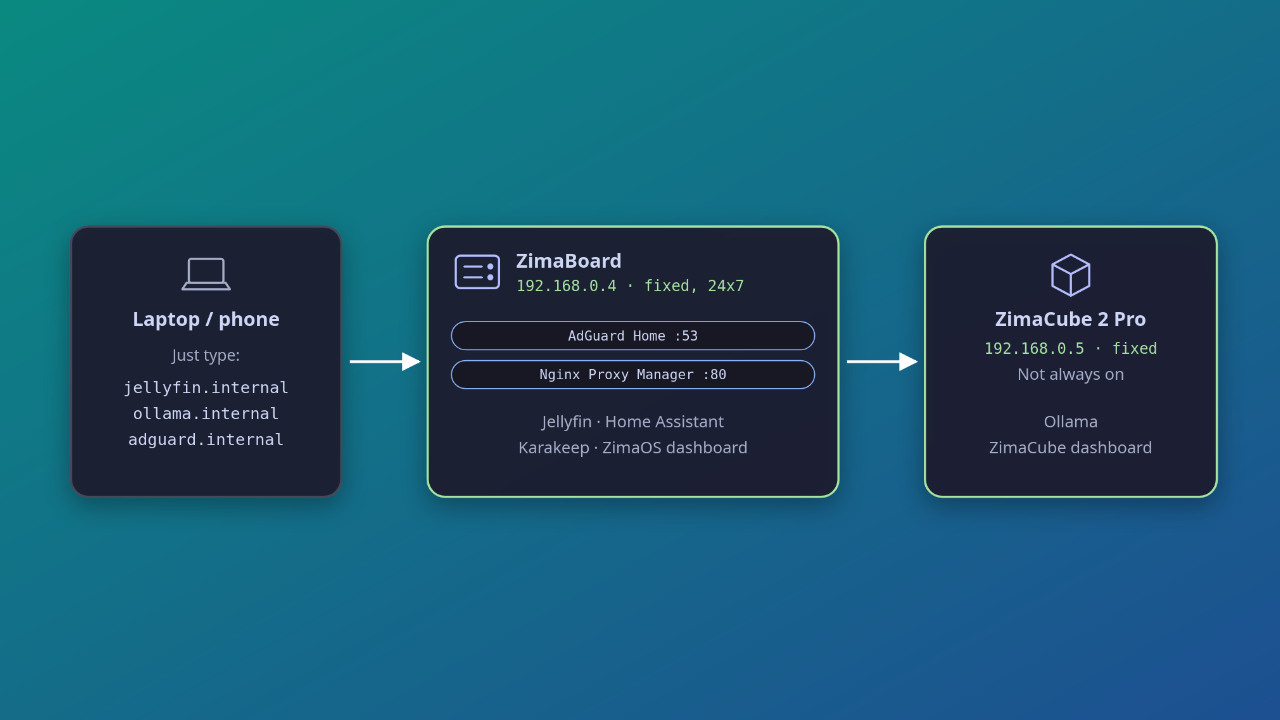
And here's what it looks like now. Both Zima devices have fixed IPs, the ZimaBoard handles DNS and the reverse proxy, and every service has a proper name.
The whole setup rests on two pieces working together. AdGuard Home, running as the network's DNS server, turns a name like jellyfin.internal into an IP address.
Nginx Proxy Manager then looks at which name you asked for and forwards the request to the right port. Because AdGuard can only work on the IP address, not port numbers.