// ITS FOSS — LINUX & OPEN SOURCE
With 10.0 Release, ONLYOFFICE Goes All in on AI, Making it the Most Modern Office Choice for Team Collaboration
ONLYOFFICE is rolling out AI tools across every editor in its suite, but the open source versions do not have them built in. The company says the choice came in response to user feedback, making it so that those versions would require separate AI tool installations.
If you didn't know, they have a few main offerings. Docs is the editor suite that you self-host or integrate into other platforms, while the Desktop Editors bring the editors to Linux, Windows, and macOS, and DocSpace facilitates room-based collaboration.
There's also the Workspace bundle of web apps and mobile apps for iOS and Android.
With the ONLYOFFICE Docs 10.0 release, they are introducing a wide range of fixes, as well as modular apps that should help make your workflow easier.
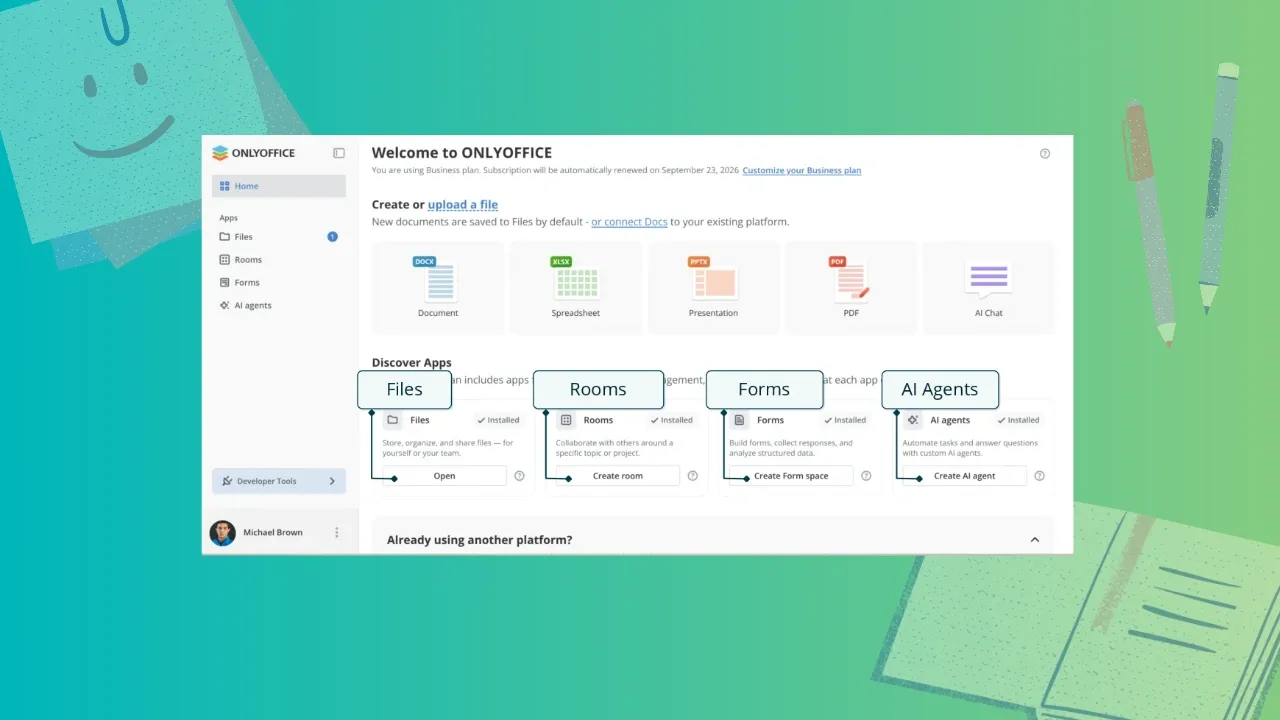
ONLYOFFICE Docs now has a home screen with an Discover Apps category that lists four pre-installed free apps: Files, Rooms, Forms, and AI agents. Each of these is an optional modular app that you use when the need arises.
In short, Files handles storing, organizing, and sharing files, Rooms is for collaborating with other people, Forms is for building forms and analyzing responses, and AI agents can be used to deploy agents for automating tasks and answering questions.
That last one supports MCP servers and can be used for extended reasoning, search, and personalized knowledge base use cases.
Let's begin with the PDF Editor. The Redact tab now has a "Remove hidden information" option that clears metadata before you share a file, and the Comment tab offers a signature option, with automatic table recognition being available for the Edit Text function.
In the Document Editor, a new "Keep with next" feature has been added to the advanced settings for paragraphs that stops a heading from being separated from its content, including in tables and block content.
Inline objects such as graphical formulas behave more reliably in right-to-left documents, and line-based cropping trims content that runs past the line height. Horizontal lines, which was introduced with Docs 9.4, also get its own settings window.