// HACKER NEWS — CYBERSECURITY
Software occlusion culling in Block Game
My GPU is the integrated Radeon Vega 8 that comes with my AMD Ryzen 7 5700G CPU. I tell you this so you know that my workstation is not a graphical computing powerhouse. It is, in fact, quite weak. To its credit my integrated GPU shows up as 48% faster on UserBenchmark than the GPU in my low end hardware target; a laptop I bought in 2012.
(Side note: I’m aware of accusations of inaccuracy surrounding UserBenchmarks, but it’s not that serious. I just think it’s funny that an iGPU I picked up recently doesn’t compare more favorably to a 14 year old laptop GPU that wasn’t considered that great even at the time.)
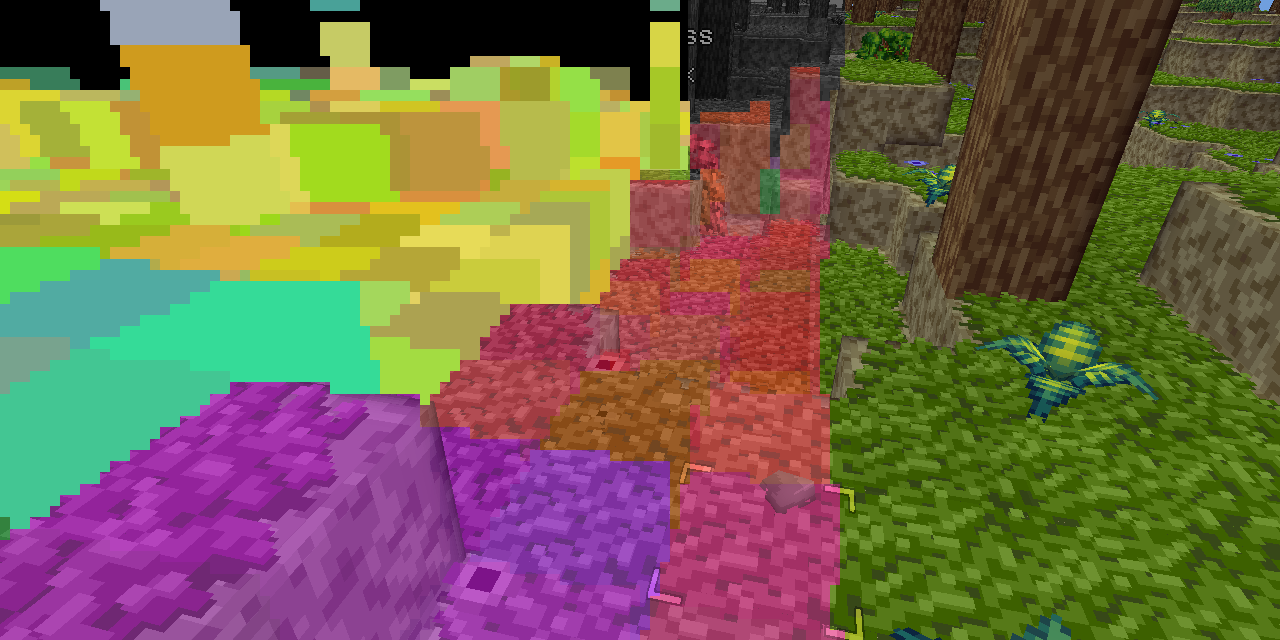
That, and the fact I want my game to run well even on a potato, is why I recently decided to try my hand at writing a software rendered occlusion culling solution for the Block Game (working title) I’m developing as I’ve always been interested in the idea. Blocks and chunks are axis aligned cubes, which makes things easier, and block games tend to have a ton of hidden geometry in the form of underground caves. There are other ways to cull these, but the algorithms tend to be fairly complex and this seemed like a good way to avoid that complexity and stick with something very conceptually simple.
In this post I’ll be explaining the development process and the solution that I eventually landed on. If you like you can also read the development thread I posted on Mastodon and Bluesky.
Before I start though I’d like to say that this came out quite well, better than I expected. It runs in half a frame at 60 FPS or less (threaded, of course) and generally culls at least 50% of the chunks that survive frustum culling. Above ground, looking straight ahead at the horizon it’ll cull around between 50 and 60% of chunks, but indoors and below ground in caves it can cull upwards of 95% of chunks, resulting in framerates of 400+ even on my weak system. All around a resounding success, though it has some cases where it breaks down which I’ll touch on at the very end of this post.
Other people have explained the concept of depth based occlusion culling better than I can, but I’ll go over it real quick. You take the scene’s depth buffer, then for every cullable thing you check that depth buffer to see if any of its pixels would be visible. If so, it’s visible. If not, it’s culled.
There’s lots of stuff you can do with this. You can render at relatively high res and conservatively downsample your buffer (always using the farthest distance) which is called hierarchical Z buffers. You can, with modern technology, enlist the help of your GPU to do this. You can use motion vectors to just reuse the previous frame’s buffer. You could use async readback to get back an actual depth buffer rendered on the GPU for analysis on the CPU without stalling your GPU.
I’ll explain my final system first and then walk you through the process of how I actually arrived at that system.
What I did is much simpler and doesn’t have any of the fancy stuff I mentioned above. I’m using FNA to create Block Game, so I’m stuck with older technology and can’t leverage the GPU’s capabilities. I could do a readback from the GPU to get the actual depth buffer, but not asynchronously, so that would necessarily involve some kind GPU stall which isn’t great. That’s why I’m just rendering on the CPU.
I render at a resolution of 256x128 pixels, and because in a block game everything is cubes, I render cubes into my depth buffer (which is a simple array of floats) and then check more cubes against the buffer.