// ARS TECHNICA — MOBILE & WEB
Googlebook review: Android on a laptop is still Android
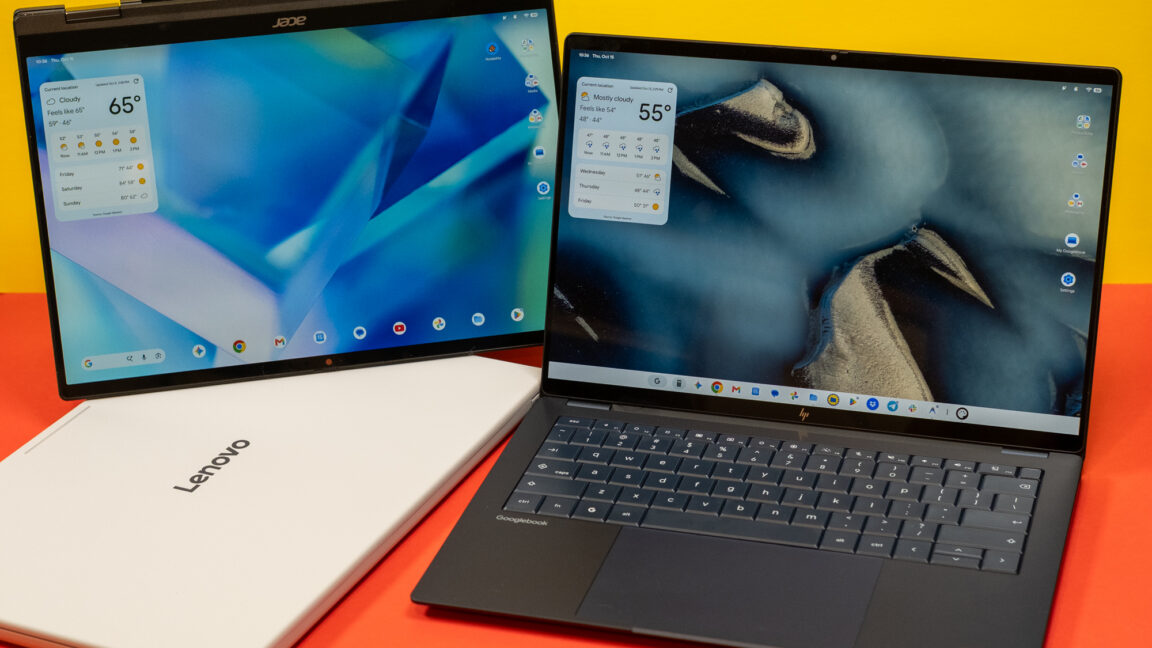
Android laptops are here, but Google has a lot of work ahead to make them good.
Android was designed for phones, but that hasn’t stopped Google from trying to adapt the OS and its apps to larger machines over the years. Googlebooks are just the latest attempt after tablets, Chromebooks, and foldables induced little change in how people interact with Android software. These new Android-powered laptops are designed to pick up where the web-focused ChromeOS left off, offering premium hardware and native support for Android apps.
Google sees Googlebooks as an alternative to Windows and macOS, but these platforms are entrenched with decades of software and UI conventions that keep users locked in. Googlebooks have to offer something very special to steal users away from either of the dominant operating systems.
For devoted Android phone users, there are some cool things in Googlebook OS, but the Android roots of these machines are impossible to miss. Sometimes it feels like using a Chromebook, and sometimes it feels like using a giant phone. It almost never feels like using a premium laptop, and that’s the problem.
While there were a few premium Chromebooks, the platform was really only successful in the budget segment. With Googlebooks, the company is almost conspicuously ignoring lower-cost options. And as most of the lineup clocks in at well over a thousand dollars, Googlebooks are not just a new take on budget-oriented Chromebooks.
All of the launch Googlebooks have excellent touchscreen displays, aluminum and magnesium bodies, biometric unlock (fingerprint or face), and big trackpads. There’s also the Glowbar, which doesn’t do very much right now. It lights up in Google colors when Gemini is activated with the wake word and during boot-up. It also shows the battery level when you plug in a Googlebook. The latter is modestly useful, but it’s not really a selling point.
There’s something in the lineup for most premium laptop buyers. If you want a convertible, there’s the Acer machine. Sleek and spendy? Asus and HP have you covered. Want something a little bigger? Lenovo has a 15.3-inch model with an HDMI port and USB-A.
The least-spendy model, the Acer Googlebook 14, starts at $899, and that’s a limited-time deal. Even this one gets a lot of the hardware right. It has a vibrant OLED screen, a metal chassis, and three USB-C ports (all of which can charge the laptop). However, you won’t get a haptic trackpad, just the old-fashioned kind that physically clicks. The supposedly DTS-tuned speakers also don’t sound great. Still, the hardware is at least as nice as any $900 Windows laptop. Acer hasn’t decided when the price will change or what it will be, but it’s at $899 for the rest of the year at least.
The next step up from that is the Dell XPS Googlebook at $999, but this model has an LCD instead of OLED. If you want the most capable Google laptops with OLED and haptic trackpads, you’re looking at spending at least $1,100 for the Lenovo version. This machine is solid, and the larger footprint allows for vents in the hinge instead of on the bottom. But I don’t love the slightly wobbly feel of the keys or the flex in the middle of the keyboard. The HP Googlebook 14 has a much nicer keyboard, a better overall look, and a Snapdragon X Elite chip inside. However, it’s also $1,300.
I appreciate that Google is pushing for things like haptic trackpads and high-resolution OLED screens, but the more expensive Googlebooks suffer from the same issue as premium Windows laptops—they don’t exist in a vacuum. If you’re spending $1,300 on a laptop, the entry-level MacBook Air is probably a better overall option for most people.