// ITS FOSS — LINUX & OPEN SOURCE
Proton Mail Wants to Organize Your Emails Automatically
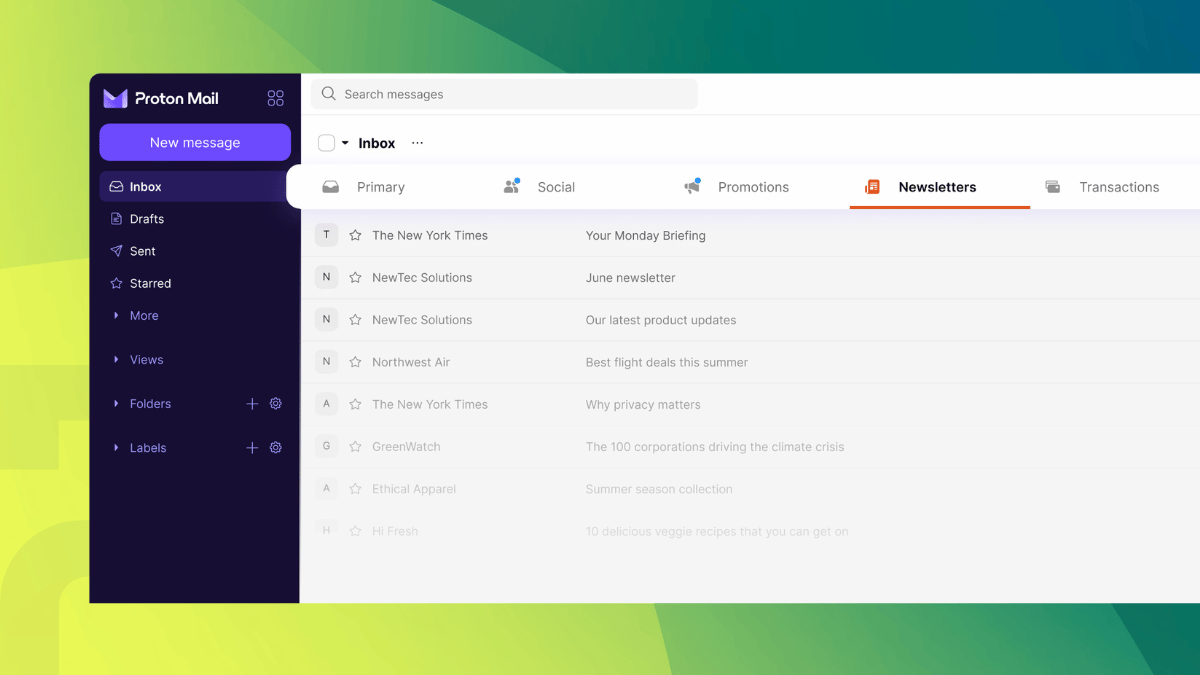
Proton Mail (partner link), the service people turn to for escaping Big Tech, has rolled out "Categories" as a new inbox view that automatically sorts incoming email into six groups: Primary, Social, Promotions, Newsletters, Transactions, and Updates.
When you receive a new mail, it gets sorted automatically into one of six categories based on metadata, without Proton reading the contents of the message. This is what Gmail already introduced years ago and it does work for most parts.
By default, Primary houses personal and work-related messages along with any important updates; Social covers social media updates and activity notifications; Promotions covers discounts and sales offers; and Newsletters carries news content you signed up for.
The other two categories can be enabled via the Settings if you require them.
Of course, we are not claiming that this is something revolutionary. Gmail and Outlook have offered inbox tabs for years, but they achieved that by scanning the contents of emails that are hosted on their servers.
Proton's approach here is different, sorting mail by metadata instead of reading what's inside each message, since its zero-access encryption keeps that content unreadable even to itself.
Anant Vijay Singh, the Product Lead for Proton Mail, goes even further to note that:
If you haven't logged into your Proton Mail (partner link) account recently, then keep an eye out for a dialog titled "Your inbox, automatically organized." It will show you two options; go with "Yes, organize it" if you want to upgrade to the new category-focused inbox experience.
If you'd rather stay on the legacy, unified inbox system, then choose "Keep inbox as before."
Once enabled, you will see the categories all lined up at the top of your emails, with a useful blue dot appearing on the ones with unread messages.