// HACKER NEWS — CYBERSECURITY
OpenShot 4.0: Record, Edit, and Color Like Never Before
Written by
Jonathan
on
Aug. 30, 2026
in
Releases
.
OpenShot 4.0 has arrived, bringing some of the biggest creative workflow upgrades in our history. You can now record your screen, webcam, microphone, and system audio directly into a project. You can correct and grade footage with color wheels, curves, LUTs, and professional video scopes. You can also isolate subjects with locally run machine learning models and create everything from animated audio visualizations to cinematic film looks. It is a major step toward a faster, more complete, and more creative OpenShot.
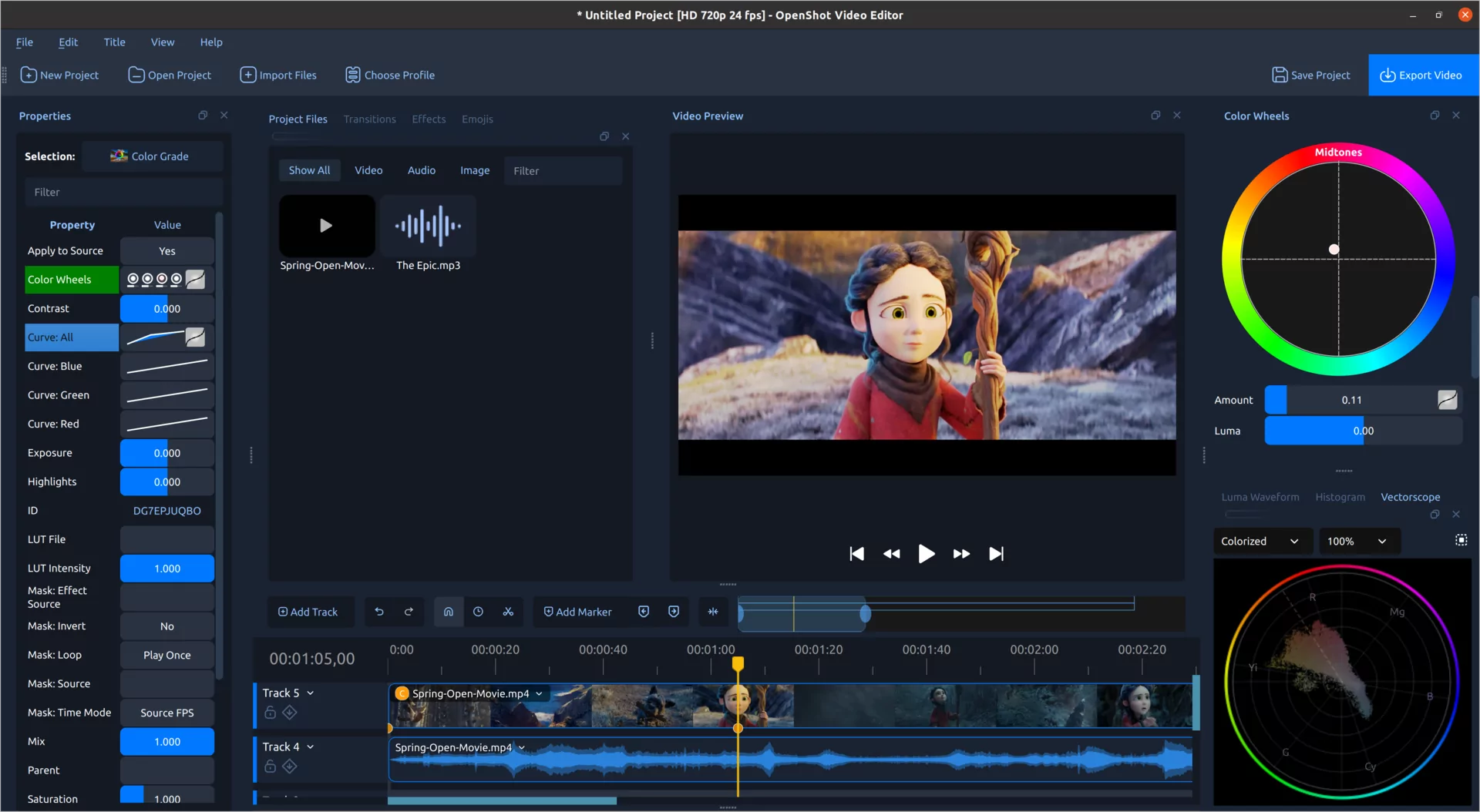
Color can fix a problem shot, guide the viewer's attention, or completely change the mood of a scene. OpenShot 4.0 brings these jobs together in a dedicated Color View with a large video preview, clip properties, color wheels, and live video scopes arranged around your footage.
You do not need to be a professional colorist to get started. Right-click a video clip and choose Look > Adjust Colors. OpenShot adds the new Color Grade effect, selects it, and opens the tools you need. You can begin with a quick adjustment and learn the more advanced controls at your own pace.
The new Color Grade effect includes practical controls for exposure, contrast, temperature, tint, highlights, shadows, saturation, and vibrance. These are useful for correcting dark footage, removing a color cast, recovering bright areas, or giving several cameras a more consistent appearance.
When you are ready to build a look, the same effect includes separate color wheels for global adjustments, shadows, midtones, and highlights. Push the shadows toward a cooler tone, warm the highlights, or make a small adjustment to skin tones without shifting every part of the image in the same way.
Four editable curves provide precise control over the full image and the individual red, green, and blue channels. Curve points and handles can be moved directly, including smooth Bézier adjustments. OpenShot also supports industry-standard .cube LUT files, with an intensity control that lets you blend a LUT into the corrected image instead of applying it at full strength.
The complete Color Grade effect is keyframable. Color wheels, curves, correction controls, LUT intensity, and the overall mix can all change over time. That makes it possible to correct lighting that shifts during a shot, animate a stylized color transition, or slowly reveal a finished look.
A monitor can be misleading. Its brightness, color settings, and the light in your room can all affect what you see. Video scopes show the actual color and brightness information inside the frame.
OpenShot 4.0 includes a Luma Waveform, Histogram, RGB Parade, and Vectorscope. The scopes update as you move through the project, so you can check exposure, find clipped highlights, compare color channels, judge saturation, and keep skin tones looking natural.