// HACKER NEWS — CYBERSECURITY
A Planet Position Widget
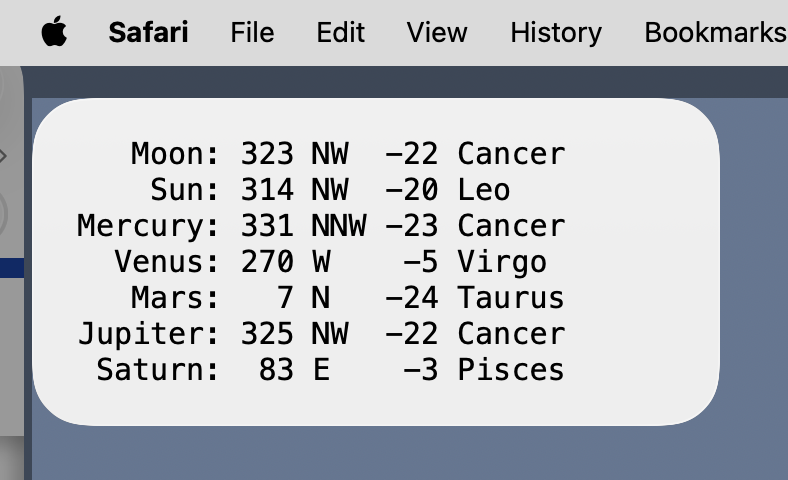
After I learned how to make a Mac widget with TerminalWidget and how to determine the locations of celestial objects with Astropy, the natural thing for me to do was combine the two into a widget that tracks the planets.
I’m using the ancient definition of planet, which includes the Sun and Moon but not anything past Saturn. The numbers are the azimuth and altitude, in that order, and are given to the nearest degree. The idea is to tell me what may be visible and where it is. This particular screenshot was taken just after 10:00 last night; there was no reason to go outside because everything was below the horizon.
I was torn on whether to include the Sun. Few of us need help finding the Sun in the sky, and you can’t see anything other than the Moon when the Sun is up. But I decided to include it anyway, partly for completeness, and partly because the visibility of some bodies depends on their separation from the Sun.
Let’s start with the code that generates the widget’s text. It’s a Python script called planets:
There’s no shebang line because of how it gets called by launchd, which we’ll get to later.
After planets imports the necessary modules, Lines 6–11 define the direction function, which takes the azimuth and returns a string with the corresponding point of the compass. I have this because 223°, which is how Astropy reports the azimuth, doesn’t immediately say “southwest” to me. The function assumes a 16-point compass, like this one:
The points are separated by 22.5°, which is why there’s a division by 22.5 in Line 10. The other parts of Line 10 adjust for the fact that North starts at 348.75° (-11.25°), the azimuth resets at 360°, and the index of a list must be an integer. Astropy may already have a function that does what direction does, but I thought it would be easier (and more fun) to write the function myself than to search through the documentation.
Lines 14 and 17 define the time and place of observation. planets will be run every half hour to update the widget, so what’s being displayed is never more than 30 minutes out of date. The home location you see above is actually the Morton Arboretum; my version of the script uses the latitude and longitude of my house.
Line 20 defines the planets list, and Lines 23–27 create a pair of dictionaries, pos and const, which contain the AltAz position and constellation of each planet. The get_body function (Line 26) gets the position, and the get_constellation function (Line 27) uses that position to figure out the constellation the body is in.
Lines 30–33 create the list of output lines, and Lines 36–38 use the run function of the subprocess module to send the output lines to TerminalWidget. The tw list contains both the full path to the TerminalWidget executable and all the options passed to it. The input parameter to run is the previously defined output, converted to a single string separated by linefeeds and encoded as bytes.