// TOM'S HARDWARE US — HARDWARE & GADGET
ASRock B860 Challenger Wifi Motherboard Review: Entry-level ATX at a great price, with drawbacks
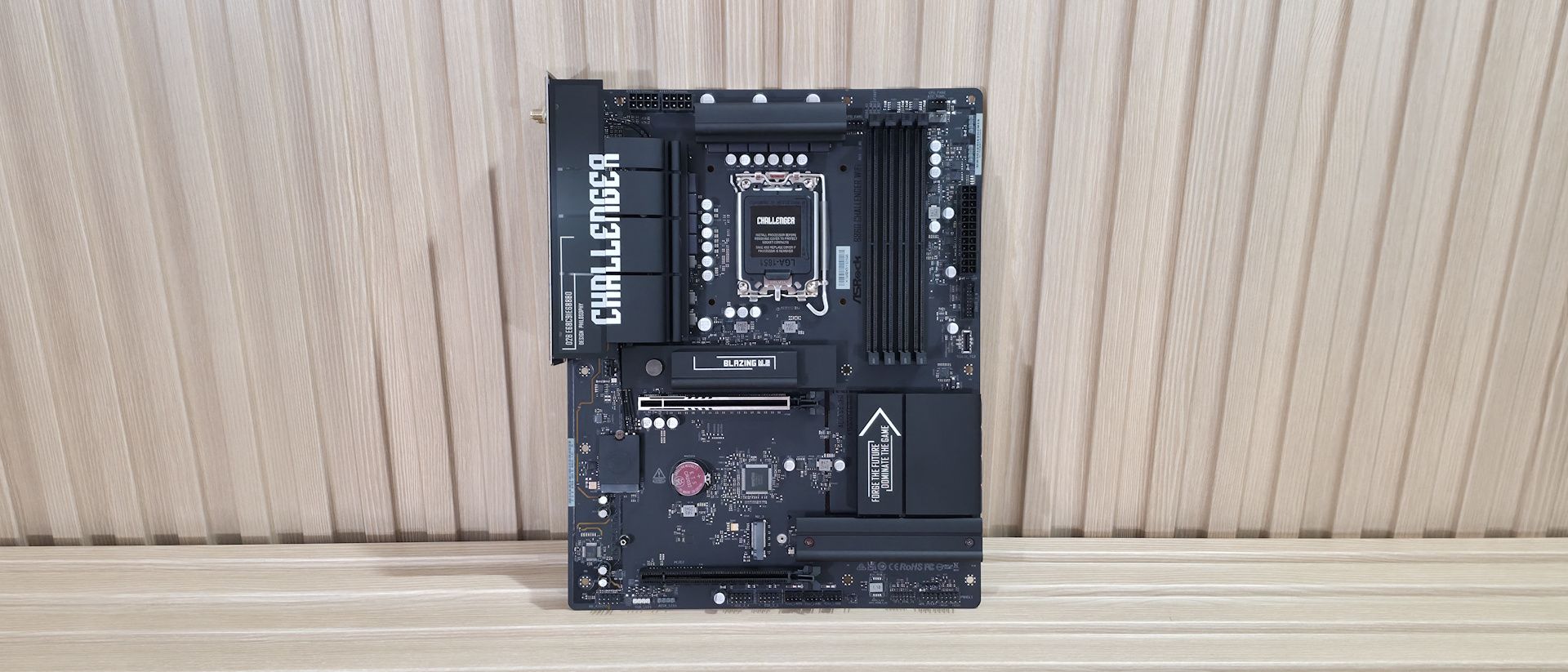
The ASRock B860 Challenger Wifi is a solid $149 budget motherboard that handles our Intel Core Ultra 270K Plus without issue, but its USB is capped at 5 Gbps, sports weaker power delivery, and its BIOS is behind the times.
Why you can trust Tom's Hardware
Our expert reviewers spend hours testing and comparing products and services so you can choose the best for you. Find out more about how we test.
Based on the mainstream B860 chipset, the ASRock B860 Challenger Wifi sits on the budget side of Intel's motherboard lineup, and costs a reasonable $149.99. You get a full-sized motherboard with full support for Intel’s Core Ultra and Core Ultra Series 2 (Arrow Lake and Arrow Lake refresh) processors. Still, some sacrifices in specs and features are inevitable at this price point.The all-black B860 Challenger (there is a white version, too) includes all the basics. You get eight rear USB ports, three M.2 sockets (one PCIe 5.0), four SATA ports, 2.5 GbE, Wi-Fi 7, and a basic audio solution. It falls a bit short on USB speed (5 Gbps max.), power delivery isn’t strong (though it handled our 270K Plus without issue at stock), and ASRock’s BIOS is fully functional but dated compared to the competition. It has everything that most will need from a motherboard, but it’s not the fastest or the best at anything, which you should generally expect from a low-priced mainstream chipset. Performance on this board was actually quite good in our testing. I have to admit, that surprised me a little given the VRM configuration. I expected it to throttle on some longer-running multi-threaded benchmarks. But the B860 Challenger proved me wrong and was average to above average across most of our tests. Whether gaming, doing office work, or juggling creative workflows, the Challenger handled our Intel Core Ultra 270K Plus without issue, though the VRMs ran hotter than on other tested boards. I would suggest using a chassis with good airflow with this board, especially if you plan to run a high-end processor and long-running, heavily multi-threaded applications.Below, we’ll examine the B860 Challenger's tested performance and other features to see if it earns a spot on our list of the best motherboards. But before we share test results and discuss details, here are the specifications from the ASRock website:
(1) USB 3.2 Gen 1 (5 Gbps) Type-C(6) USB 3.2 Gen 1 (5 Gbps)
(1) PCIe 5.0 x4 (128 Gbps) / PCIe (up to 80mm)(2) PCIe 4.0 x4 (64 Gbps) / PCIe (up to 80mm)
(1) USB v3.2 Gen 1 (5 Gbps) Type-C(1) USB v3.2 Gen 1 (5 Gbps)(2) USB v2.0 (480 Mbps)
ASRock includes a few accessories to help get you up and running. You get two SATA cables, an M.2 screw and mount, Wi-Fi antennas, stickers, and a quick installation guide. The collection is sparse, but typical for a low-cost mainstream-class motherboard.
The B860 Challenger sits on a matte-black PCB with black connectors and heatsinks. Only the Challenger branding on a couple of heatsinks and the capacitors dot the board, breaking up the stealthy appearance. It lacks a ‘full coverage’ heatsink on the bottom, partly due to the M. 2's physical orientation, but two of the three M.2 sockets do have heatsinks. You won’t find any integrated RGB, but the board has multiple headers to add your own.
Overall, this is a plain-looking board with a lot of exposed PCB, but that's typical for this chipset and price. Still, it will blend well into any dark build theme.
In the top-left area of the board, we see the standard dual 8-pin EPS connectors to power the processor. Below that is the large VRM heatsink that extends to the rear IO area and covers some unsightly motherboard components. On top, we can see the silver Challenger branding. A second VRM heatsink covers the top portion of the power delivery. Both appeared to make good contact with the MOSFETs and inductors/chokes below.Moving right, past the socket, the next feature is the four DRAM slots, each with locking mechanisms on both sides. ASRock lists support fo