// TOM'S HARDWARE US — HARDWARE & GADGET
ASRock X870E Taichi White Motherboard Review: A Taichi washed in white, now with 10 GbE
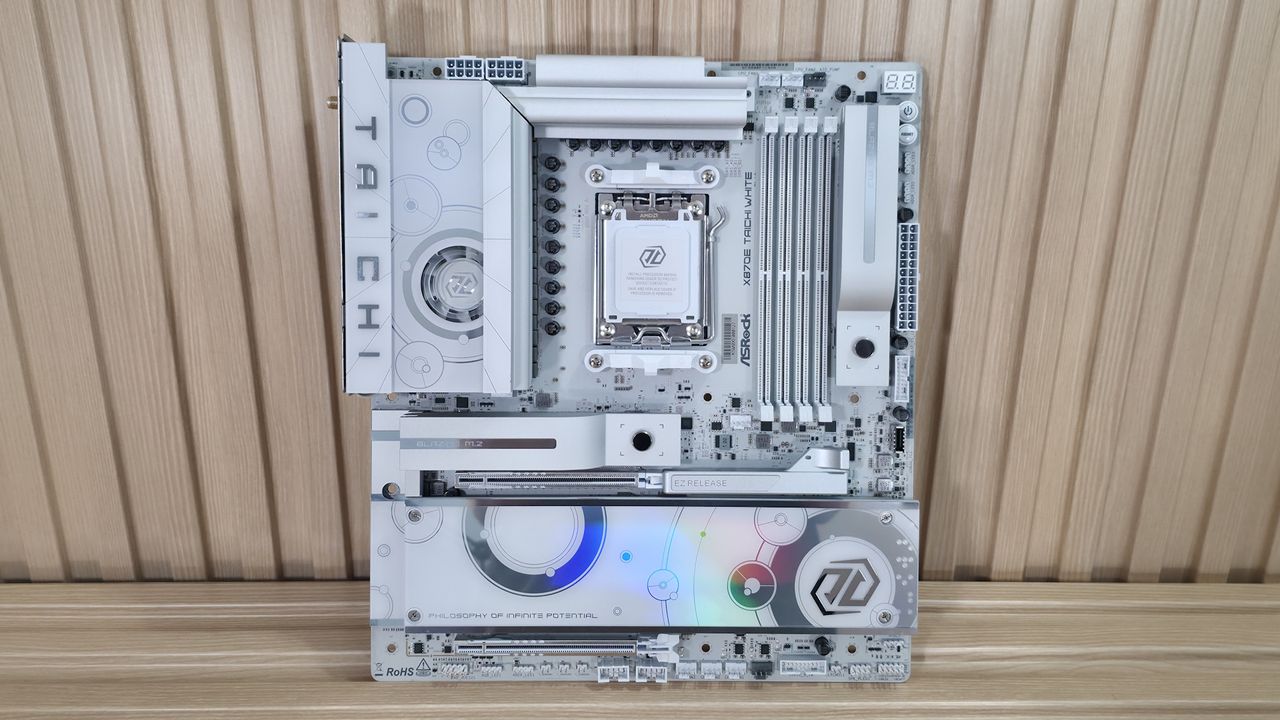
The X870E Taichi White wraps everything we liked about the original in a cleaner all-whiote look, adding 10 GbE, and still with active VRM cooling. It's pricey, handsomely equipped with the new aesthetic the real winner
Why you can trust Tom's Hardware
Our expert reviewers spend hours testing and comparing products and services so you can choose the best for you. Find out more about how we test.
In late 2024, we reviewed ASRock’s X870E Taichi motherboard and loved its feature set, DIY-friendly nature, and loads of USB ports on the rear IO. Fast-forward to today and we’re covering the newly released ASRock X870E Taichi White. In addition to the different colorway and updated aesthetics, it also receives some iterative feature updates. This includes native 9950X3D support, faster Ethernet, and it’s ASRock’s first motherboard to feature all-white components. But the biggest changes with are the board’s improved looks.
Priced at $449.99 (or $438.99 on Newegg), it’s not inexpensive. But ASRock’s Taichi lineup always delivered the goods, offering flagship-class hardware that cost less than the competition. It may not have a fancy LCD screen like others, but it doesn’t have that same flagship price. Still, it does come with high-end features, including overbuilt power delivery (now with active cooling), 10 GbE (up from 5 GbE), a flagship audio solution with an integrated DAC, and even support for multi-GPU (AMD CrossFire). You get the same M.2 count (four), but fewer SATA ports (three, from six), DIY-friendly features, and plenty of USB ports on the rear IO, including two USB4 (40 Gbps) and Lightning Gaming ports. In short, it’s handsomely equipped.Performance testing proceeded without a hitch, and the results were average overall. The results showed it was not only a solid productivity machine, be it rendering, encoding, or office work, but also showed it’s a competent gamer too. While it didn’t set the world on fire performance-wise, it was relatively consistent across the board.Below, we’ll examine the Taichi White’s performance and other features, and decide if it has a chance to make our list of the best motherboards. But before we share test results and discuss details, here are the specifications from the ASRock website:
(2) USB 4 (40 Gbps) Type-C(5) USB 3.2 Gen 2 (10 Gbps)(3) USB 3.2 Gen 2 (10 Gbps)
(1) PCIe 5.0 x4 (128 Gbps) / PCIe (up to 80mm)(3) PCIe 4.0 x4 (64 Gbps) / PCIe (up to 80mm)
(1) USB v3.2 Gen 2x2 (20 Gbps) Type-C(2) USB v3.2 Gen 1 (5 Gbps)(2) USB v2.0 (480 Mbps)
Realtek ALC4082, ESS SABRE9219 DAC for rear panel audio
Inside the box with the motherboard are a few accessories to get you started. You get four SATA cables (for three ports), three thermistor cables, an ARGB splitter cable, and last but not least, the Wi-Fi antenna. It’s not much, but it will at least get you a good wireless internet connection and let you attach SATA-based drives without a trip to the store.
The Taichi White, like the original, keeps the same general design, with a vertical M.2 socket to the right of the RAM, and it uses a white, 8-layer PCB with beefy heatsinks covering the VRMs and two M.2 sockets, with the rest more of a plate-style cooling. Gone is the polarizing look of the original, with the gold dots and distinct cogs as the main design feature, moving to a more subtle look. We spy the Taichi branding on the left VRM heatsink, and you can see the small VRM fan, which is a unique look.