// ARS TECHNICA — GAMING
This emulator reimagines Nintendo’s Virtual Boy with a full color display
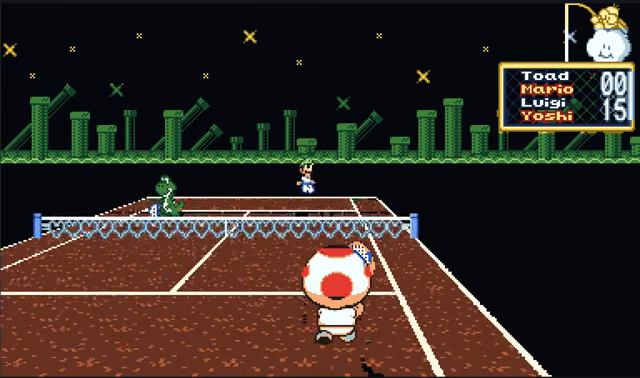
Tile-based color palettes go way beyond the four shades of red on original hardware.
Last year, we reported on Red Viper, a Virtual Boy emulator that added a splash of Super Game Boy-style color to Nintendo’s famously failed red-on-black “portable” 3D headset from the ’90s. Now, a new emulation experiment, VBoy Color, has taken the concept to a higher level, using a tile-based palette system that allows for many more distinct colors in each individual Virtual Boy frame.
Rather than simply replacing the Virtual Boy’s four shades of red with four different colors, VBoy Color’s readme files explain how the emulator’s game-specific Color Packs can assign a distinct four-color palette to each 8×8 tile in a Virtual Boy scene. That means the emulator can differentiate between green pipes, grey platforms, and red brick wall in Mario Clash, for instance, even though all those in-game objects share the same overlapping red hues in the original game.
The Game Boy Color-esque results feel like being transported into an alternate history where Nintendo invested in a full-color display rather than cheaper red LEDs for the Virtual Boy hardware. The increased contrast between differently colored elements is particularly welcome in games like Jack Bros. or Vertical Force, where the original red-on-red display often makes it hard to differentiate the player-character from busy red background elements.
VBoy Color comes with built-in color packs for 15 different games, which actually represents a significant chunk of the Virtual Boy’s limited official library. Tinkerers can edit those packs manually using built-in video tools to color individual screens, teaching the emulator which colors to assign whenever that same tile is used elsewhere in the game.
Unfortunately, the re-coloring process doesn’t work perfectly in the current beta release. For one, the coloring algorithm seems to occasionally miss individual tiles, leading to some flickering, uncolored squares that stand out distractingly from their surroundings.
For another, this coloring process doesn’t work on games like 3-D Tetris or Red Alarm that eschew tile-based graphics for a more 3D wire frame effect. For these, VBoy Color also offers an option that lets you apply new palettes or color gradients based on the apparent depth of each line, making it easier to discern the 3D effect (especially on a flat monitor).
Even in its early state, VBoy Color features some high-quality emulation (built off of previous emulators like VirtualBoyGo and Beetle VB) and useful features like full stereoscopic support on VR headsets or 3D monitors. All in all, it’s nice to have yet another emulator that goes beyond accurate gameplay to actually improve on the experience delivered by original hardware.